
BOM Scrubbing for Turnkey PCB Assembly: 10 Checks Before You Quote
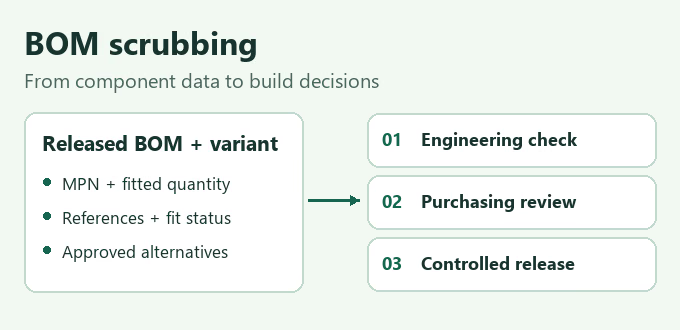
Table Of Contents
BOM scrubbing checks whether a component list is consistent, identifiable, and usable for the intended build. Start with the released board revision, reconcile fitted quantities and reference designators, verify complete manufacturer part numbers, and flag sourcing questions before purchasing. Record every unresolved item and its owner.
A scrubbed bill of materials should tell the buyer what can be quoted, what is approved for purchase, and what still blocks assembly. A database match alone cannot establish electrical suitability, an approved substitution, or readiness to start production.
AssemblePCB coordinates PCB fabrication, component sourcing, assembly, and agreed inspection and testing for turnkey projects. This guide shows engineers and purchasers how to prepare the BOM decisions that support that coordinated quotation.
What Does BOM Scrubbing Check?
BOM scrubbing is the review of a bill of materials for errors, inconsistencies, and component procurement risks. It combines data checks with engineering clarification and purchasing review. The useful output is a corrected revision plus an issue log, with decisions linked to the affected line items.
Prepare an editable BOM, assembly variant, board quantity, schematic, assembly drawing, and placement data from the same release. Mark missing files or provisional requirements. Do not silently mix an updated BOM with an older placement export.
Useful columns include line ID, internal part number, manufacturer, complete manufacturer part number (MPN), description, footprint or package, quantity per board, reference designators, fit status, and approved alternatives. Keep distributor order codes, sourcing evidence, and approval records in distinct fields or linked documents.
A quotation can carry explicit assumptions. A purchase order or production release needs the approvals appropriate to that action. Identify these states separately throughout the review.
A BOM Scrubbing Checklist: 10 Checks Before Purchasing
1. Freeze the revision and assembly variant
Identify the board number, BOM revision, variant, and requested quantity. Check them against the released assembly documents. For several variants, use separate controlled BOMs or an explicit variant matrix. A component fitted on one version may be absent or different on another.
2. Reconcile quantities, reference designators, and DNP entries
Expand reference ranges, check for duplicate designators, and compare the unique fitted positions with the quantity per board. If a row states eight parts but lists only seven fitted positions, open a question. Resolve it against the design release rather than choosing whichever number is larger.
Make do not populate (DNP) status explicit. Preserve unfitted locations where needed to explain the variant, while excluding them from fitted-part demand. Distinguish PCB placements from loose accessories, programmed spares, and mechanical items supplied separately.
3. Verify the complete manufacturer part number
Match each MPN to its manufacturer and current product documentation. Retain meaningful suffixes, punctuation, and leading zeros. A family name may identify several voltage grades, packages, or ordering configurations. Keep the manufacturer identity separate from a distributor stock number.
4. Cross-check electrical and mechanical requirements
Compare the identified part with the description, schematic, footprint, and assembly drawing. Check values, tolerance, ratings, dimensions, pin assignments, polarity, and orientation as applicable. Normalize units so that 4.7 kΩ does not become 4.7 Ω during import.
Define the size convention. For example, imperial 0603 and metric 0603 describe different sizes. Use dimensions or the manufacturer package drawing to remove ambiguity.
5. Check lifecycle status at the manufacturer
Record the exact orderable device, status source, and review date. Texas Instruments distinguishes active, not recommended for new designs, last-time-buy, and obsolete products in its product lifecycle guidance. Check the relevant manufacturer’s own terminology and notices.
A device classified as NRND may still support an existing design. Record whether this is a new design, a repeat build, or a legacy support order before deciding whether a change is needed. Do not treat low distributor stock as proof of manufacturer obsolescence.
6. Check availability for the required quantity and date
Capture the source, quoted quantity, price basis, lead time, and check date. Verify whether the quantity is available to order or subject to allocation or confirmation. Flag split deliveries and long-lead items. A stock snapshot is purchasing evidence at a particular time, not a reservation.
7. Review MOQ, order multiples, and assembly packaging
Minimum order quantity (MOQ), purchasing increments, and reel quantity are different commercial facts. Check the actual offer. Cut tape, a full reel, a custom reel, trays, or tubes can lead to different handling requirements.
Ask the assembler to confirm feeder compatibility and any setup allowance or repackaging. DigiKey’s custom-reel explanation shows how leaders and trailers can support automated feeding. Available packaging services must still be confirmed for the selected item.
8. Separate proposed alternatives from approved substitutes
Keep a candidate in a review column until the product owner approves its scope of use. Matching value and package does not establish interchangeability. For a regulator, review pinout, voltage range, stability requirements, thermal behavior, and startup behavior against the application.
For ceramic capacitors, compare effective capacitance under operating conditions as well as the nominal value. Murata explains DC-bias effects in high-dielectric ceramic capacitors. Record the technical comparison and any required product validation before releasing an alternative.
9. Confirm sourcing responsibility and supplied-material condition
Mark each line as supplier-procured, customer-supplied, or otherwise agreed. For customer stock, confirm accepted quantity, identity, packaging, and condition before deducting it from demand. Review moisture-sensitive handling and any special assembly instructions against the component documentation and agreed process.
Document required sourcing channels, traceability evidence, material declarations, and customer-specific restrictions. State whether programming, marking, or component preparation is included. Ask who owns unused purchased material and how returns or storage will be handled.
10. Close issues and release a controlled purchasing package
Give each issue an ID, affected line or designator, consequence, owner, and required decision. Record the approved answer, date, and affected build quantity. Carry approved changes into the controlling BOM and linked assembly files. A resolved email thread should lead to an identifiable released configuration.
A Worked BOM Review Example
This example is hypothetical and is not a customer project. Assume a 50-board controller build. These issue records show the decisions to request, rather than real component recommendations.
| Record | Finding | Decision and owner |
|---|---|---|
| BOM-01 · resistor group | Quantity is 8, but only R1–R7 are listed as fitted. | Engineering reconciles the released design and corrects the quantity or missing reference. |
| BOM-02 · C12 | The description says 10 µF. The matched ordering code identifies 1 µF. | Engineering confirms the intended specification and exact MPN. Hold the affected purchase until resolved. |
| BOM-03 · U4 | A family name is supplied without a complete orderable package and grade. | Engineering supplies the full MPN. Purchasing then checks that specific device. |
| BOM-04 · C20 | The variant drawing marks DNP, while the BOM requests one per board. | The product owner confirms the variant and updates both records consistently. |
| BOM-05 · J2 | An alternative is available but has a different mating arrangement. | Engineering checks mechanical and system compatibility before approving any substitution. |
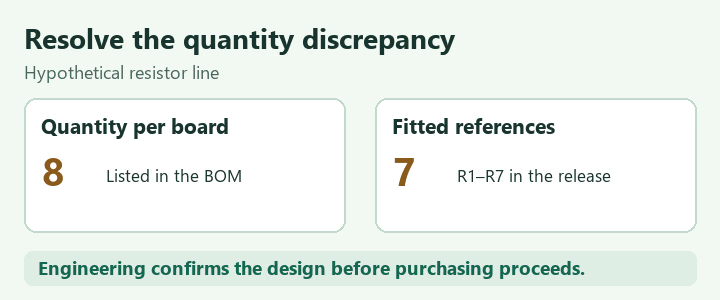
Once BOM-01 is resolved, the fitted count becomes an input to purchasing. Before that decision, both the material total and quotation assumptions remain provisional. Keep technical issues separate from commercial options so a lower price cannot accidentally become design approval.
Planning a turnkey build? Include the unresolved questions with your BOM and quantities. Explore our electronic component sourcing and PCB assembly service for coordinated purchasing and manufacturing. Ask for the material assumptions and open decisions to be identified in the quotation.
Calculate Procurement Quantities for Low-Volume PCB Assembly
Maintain separate fields for fitted quantity per board and quantity to purchase. The latter can include an agreed placement-loss allowance and setup quantity. Neither should silently change the design BOM.
Net quantity to buy = max(0, build demand + agreed allowances − accepted available stock)
For this hypothetical example, assume the resistor line is confirmed at eight fitted parts per board:
- Build demand: 8 × 50 = 400 parts.
- Planning allowance: 2% of 400 = 8 parts, plus 12 setup parts, giving 420 parts required.
- Accepted available stock: 100 suitable parts allocated to this build. Net purchasing need is 420 − 100 = 320 parts.
- Offer conditions: MOQ 100, with quantities ordered in multiples of 50. The order quantity is 350 parts.
The 2% and 12-piece allowances are planning assumptions, not measured yield data or universal assembly requirements. Here the order multiple applies to the entire ordered quantity. Recalculate for an offer that uses another rule. If net purchasing need is zero, no MOQ-based purchase is needed.
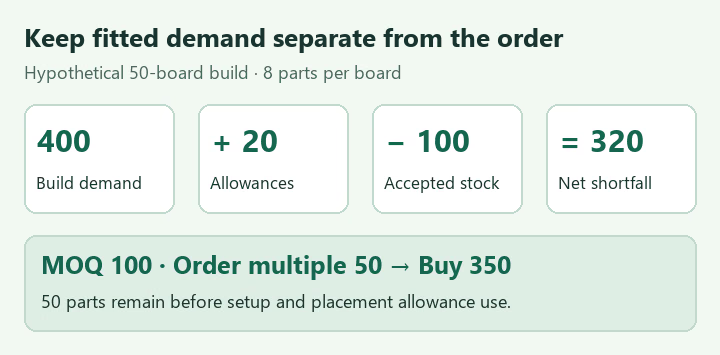
After assembling 50 boards, 50 parts remain before allowance consumption: 100 + 350 − 400 = 50. If all 20 allowance parts are consumed, 30 remain. Document actual usage and ownership instead of promising that the 30-piece ordering excess is the final returned stock.
For a cost comparison, separate purchased-material charges, setup or packaging services, PCB fabrication, assembly, and the agreed test scope. Compare the same build quantity and approved parts list across quotations.
Separate Quotation, Purchasing, and Build Release
A BOM review can support a budgetary quotation while some decisions remain open. Label assumptions, exclusions, and validity conditions. Before committing to parts, close the relevant identity, quantity, alternative, and commercial questions.
| Decision | Evidence to record | Open-item handling |
|---|---|---|
| Ready to quote | Defined scope, versions, quantities, source assumptions, and explicit exclusions. | List provisional lines and identify what could change price or schedule. |
| Approved to purchase | Exact parts, approved alternatives, quantities, source and packaging conditions, and purchasing authorization. | Hold affected lines unless a documented exception authorizes a specific purchase. |
| Ready to build | Accepted materials and reconciled assembly files, with required program and inspection inputs released. | Hold the affected build or variant until the responsible owner approves resolution. |
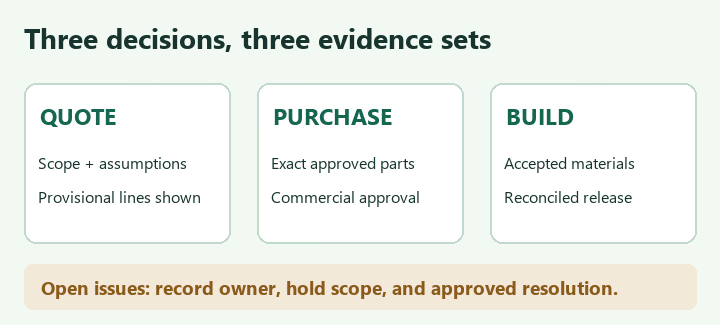
For split procurement, identify exactly which lines can proceed and who accepts the commercial risk. Recheck availability and affected documents after a revision or purchasing delay. Keep the approved build package and decision log together.
BOM Scrubbing FAQs
Can an automated BOM tool approve substitute components?
A tool can identify matches, flag supply risks, and suggest candidates. The product owner must approve substitutions against the application and agreed validation requirements. Preserve the approval and update the controlled BOM.
Is BOM scrubbing the same as a DFM review?
The activities overlap but answer different questions. BOM scrubbing focuses on component identity, data consistency, and procurement decisions. Design for manufacturing (DFM) review examines whether the physical design can be manufactured through the intended process. A clean component list does not establish acceptable pad geometry or assembly clearances.
Should DNP components be deleted from the BOM?
Use a controlled fit-status or variant method. Keeping an explicit DNP record can clarify why a location is not populated. Ensure purchasing and placement exports interpret it consistently and do not include it in fitted-part demand.
How often should a released BOM be reviewed?
Review the affected lines after design or variant changes. Refresh supply evidence before new purchasing commitments, especially after a quotation expires or stock conditions change. A repeat assembly order still needs a check against its current approved release.
Send a BOM That Supports a Clear Turnkey Quote
Effective BOM scrubbing ends with decisions that the buyer and assembler can follow. Reconcile the release, identify exact parts, separate fitted demand from purchasing allowances, and document approvals before committing to materials or starting the build.
Send AssemblePCB your editable BOM, Gerber or fabrication dataset, placement data, assembly drawings, quantities by variant, and target delivery date. Include approved alternatives, customer-supplied materials, test or programming requirements, and the questions still open.
Request a coordinated quotation with material assumptions, procurement exceptions, assembly scope, and the achievable schedule identified. Use the quote option on our assembly service page to submit the project package.
Request a Turnkey PCB Assembly Quote
The BOM issues, quantities, and commercial rules above are illustrative. Apply the released product requirements, manufacturer documentation, actual supplier offer, and agreed approval process to your build.
Contact Us
Phone: +86-18123905375
Email: sales@assemblepcb.com
WhatsApp: +86-18123905375
Wechat: +86-18123905375
Free Queto
Latest Blog
Table Of Contents
Contact Us
Phone: +86-18123905375
Email: sales@assemblepcb.com
WhatsApp: +86-18123905375
Wechat: +86-18123905375
Free Queto
